What is JUVOSpark
JUVOSpark is an EdTech platform in which the educational scenario for students lives in Telegram, while operations for the teacher and platform owner live in a web admin panel powered by a secured Admin API.
The platform closes not just one "bot feature" but a bundle of processes: testing, scheduling, homework, payment tracking, reminders, support, and controlled scaling to teachers.
The key product principle is simple and strict:
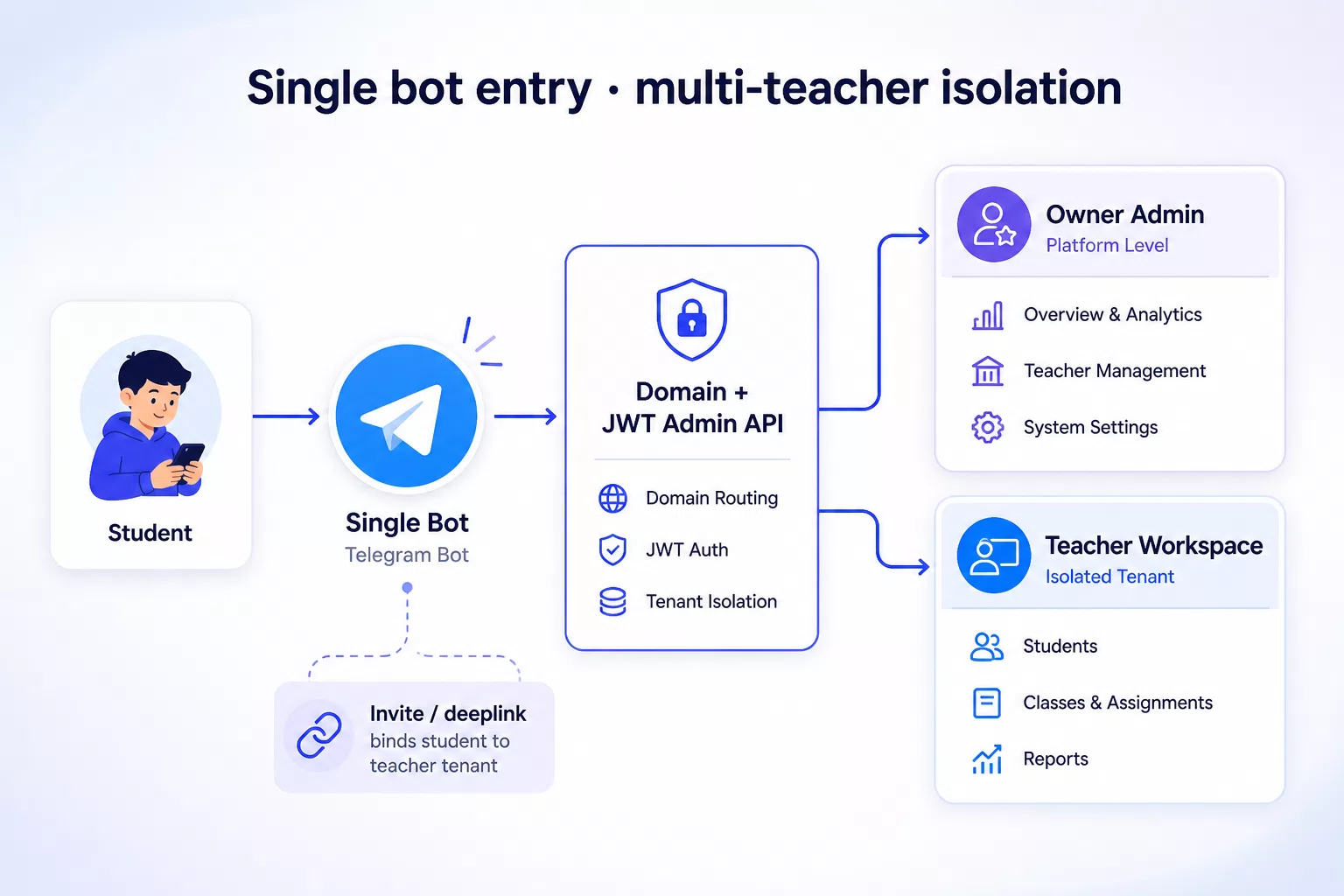
One shared bot — a unified entry point. Separation by teacher is done through invites and deeplinks, not through separate bots.
Why "just another Telegram bot" is a weak problem statement
When a team says "we need a bot for learning," they usually mean a menu, a couple of scenarios, and a mailing list. In practice, an EdTech product very quickly hits operational questions:
- where the student takes tests and sees results;
- where they check the schedule and the lesson link;
- how they receive homework after a lesson;
- how to gently remind them about payment;
- where to write to support if something goes wrong;
- how the platform owner connects new teachers without opening public registration;
- how to avoid mixing data from different teachers in a single channel.
If these questions are not built into the architecture from day one, the product either remains a "demo bot" or starts accumulating workarounds: separate bots for each teacher, manual spreadsheets, chats without statuses, access "for everyone."
That is exactly why JUVOSpark was designed not as a chat widget, but as a platform with a clear model of entry, roles, and isolation.
The most common mistake in Telegram EdTech
The most common mistake is scaling a product by cloning bots.
A new teacher — a new bot.
A new group — another token.
A new brand within the network — yet another instance.
After a few months, it's already hard to confidently answer:
- how many bots are actually in production;
- where the unified UX and unified texts are;
- how to update logic for everyone at once;
- who owns which data scope;
- how to safely grant access to a new teacher;
- what to do if a student switches to another teacher.
Typical anti-patterns that we consciously avoided:
- a separate bot for each teacher;
- open self-registration in the admin panel;
- a common "mess" of content without tenant isolation;
- teacher functions directly in the student bot without a clear UX boundary;
- payments via acquiring in v1 "because it looks more solid," even though the operational pain was in tracking and reminders.
Lack of answers to these questions turns growth into maintenance chaos. That is why JUVOSpark chose a different path: one bot, invite-only growth, data isolation.
What problem we were solving
We needed an EdTech platform where:
- the student receives training and service in one familiar channel — Telegram;
- the teacher and platform owner manage content and operations from a web admin panel;
- onboarding new teachers happens in a controlled way, without public registration;
- students of different teachers don't see each other's content or data;
- the infrastructure stays simple: one bot process, one Admin API, predictable deployment.
The goal of v1 is not "to fulfill all EdTech dreams" but to build a stable scope: education + operations + scaling to teachers.
Architectural solution: single bot + invites
Unified entry point
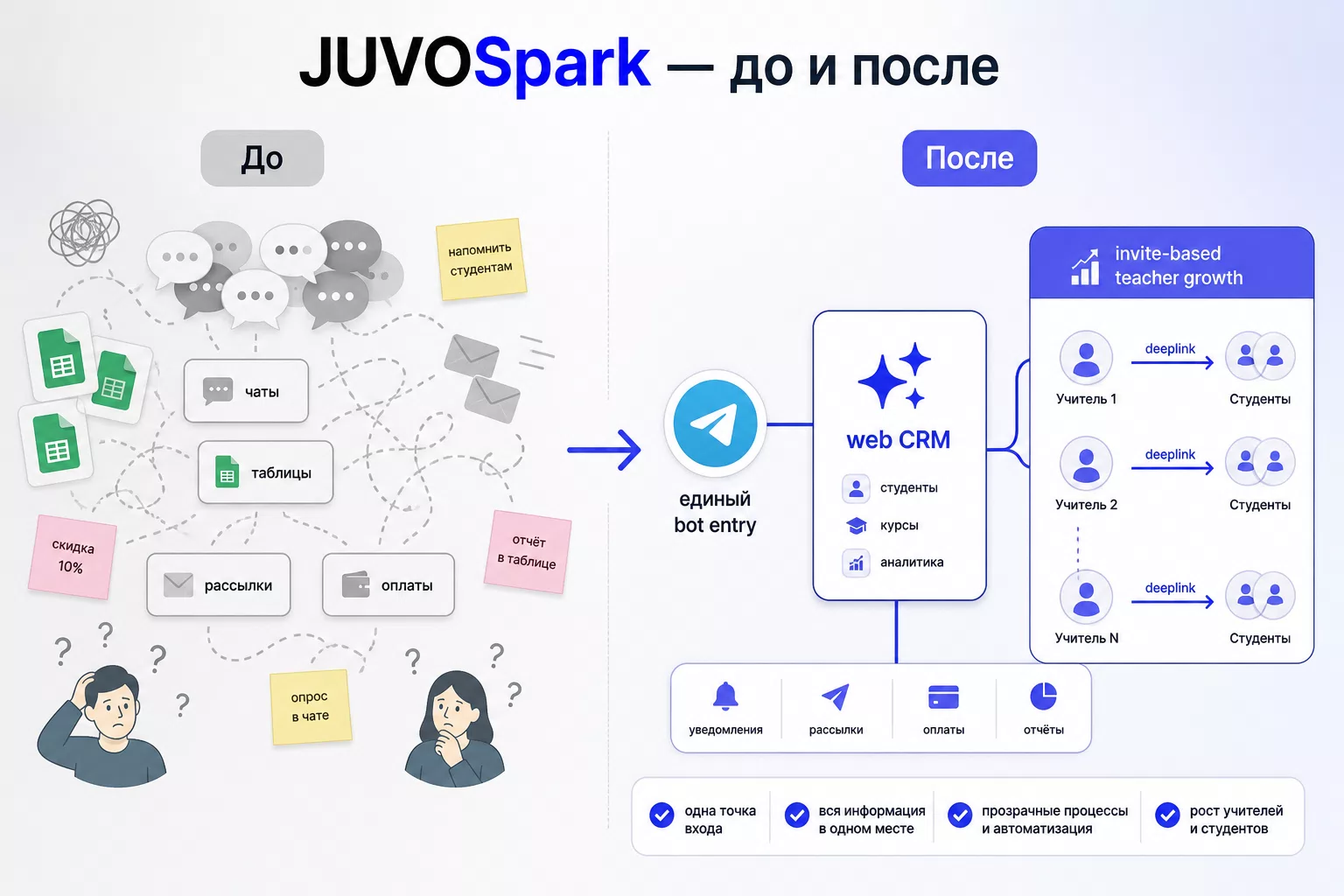
The student always enters the same platform bot. This is a unified brand channel, unified UX, and a single point of updates.
There are two entry scenarios:
- General bot link. The user starts without a personal token and enters the system as a lead. The platform owner can later manually attach them to a specific teacher.
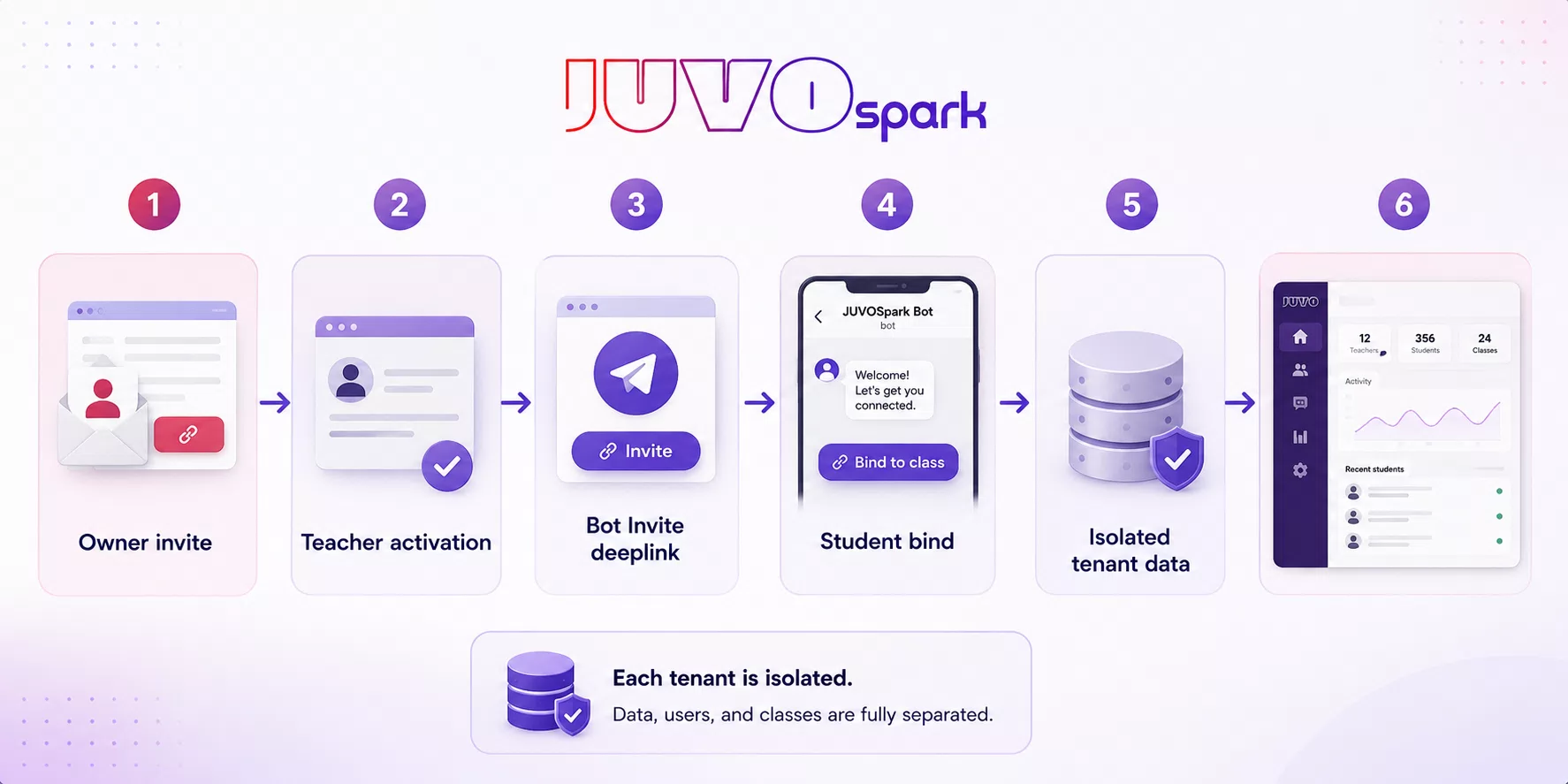
- Teacher's personal deeplink. The student opens a link of the form "bot + start parameter with teacher token." The bot binds the student to that teacher, and from then on the student sees only their tests, schedule, homework, and contacts.
Invite-only for teachers
Teachers do not register in the admin panel themselves. Access is granted by the owner:
- The owner assigns the Teacher role.
- A single-use invite to the web admin panel is generated (with TTL, the ability to revoke and reissue).
- The teacher activates access (email + password).
- In the admin panel, they receive a personal Bot Invite link for students.
- They can copy the link, reissue the token, or deactivate it.
This way, the platform grows without open signup and without an anti-spam layer "across the entire internet," while preserving the owner's control over who actually gets a workspace.
Isolation and roles
In the v1 model, there are three key roles:
- Owner — platform management, teachers, student transfers, monitoring.
- Teacher — their own space: students, tests, lessons, homework, payments, settings, bot invite.
- Student / lead — the Telegram scenario.
An important UX rule: if a user is both a teacher and a student, they always see the student flow in the bot. Teacher management lives in the web admin panel. This reduces confusion and prevents Telegram from turning into a "second admin panel."
What the student sees in the bot
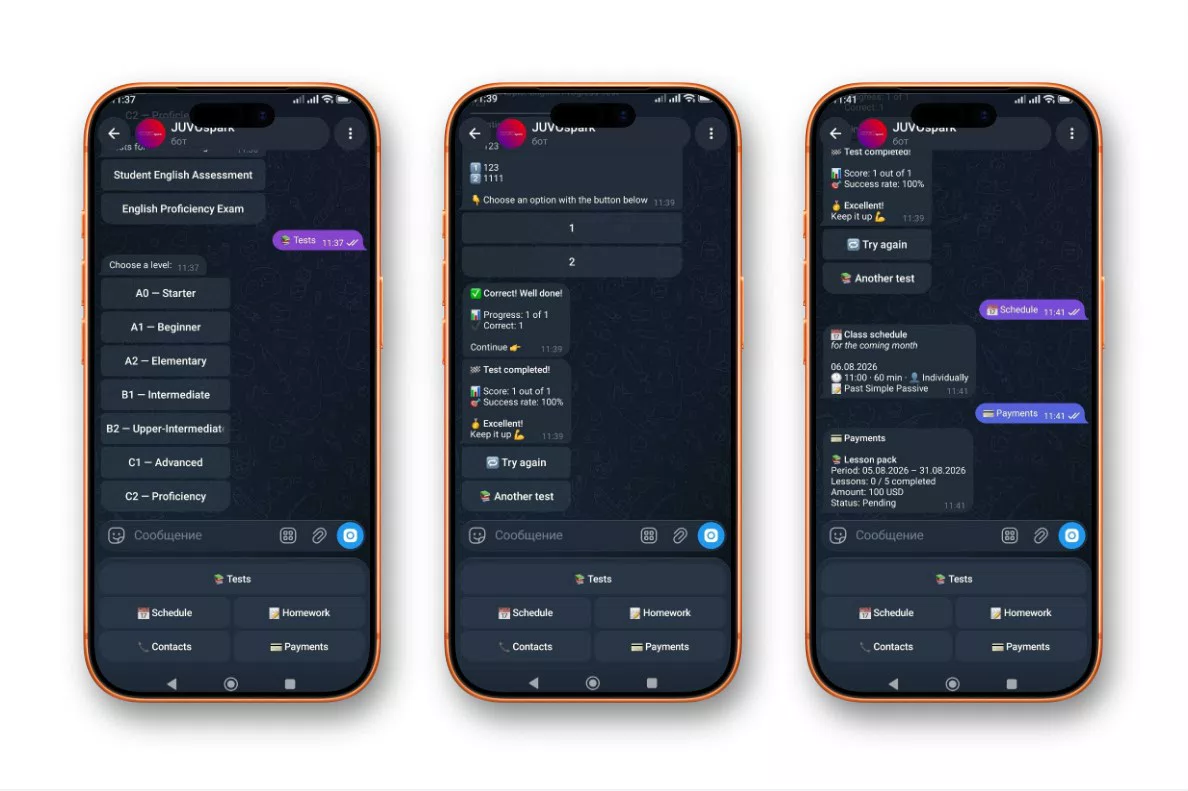
The educational scope in Telegram is built as a complete scenario, not a set of disconnected commands.
After /start, the student gets a menu:
- Tests — level selection (created by the teacher in their settings), taking a test with optional timer, answer options and text input, multimedia questions (audio, video, images), feedback, and a final result with the option to retake;
- Schedule — upcoming lessons for the month, time, type, notes, link to the meeting platform;
- Homework — assignments that become available after a lesson; task card and completion status;
- Contacts — contacts and materials managed from the admin panel;
- any free text — goes to support.
In other words, Telegram here is not a "showcase" but a working channel for learning and service.
What settings and operations are available through the bot
A separate platform layer — operational scenarios directly in Telegram for the platform administrator.
In the bot's Admin Panel, the following are available:
- Statistics — summary of users and activity;
- Broadcast — mass messages with send-rate limiting and a final report;
- Metrics — operational service metrics;
- Support — request queue, answered/unanswered filters, reply to a student without leaving Telegram;
- User Interface — view the student interface "through the user's eyes."
Additionally, daily reminders about payments and lessons run in the background. This is important: the platform doesn't only react to user actions but also maintains the rhythm of learning and payments on its own.
It is precisely this layer that makes the bot not a demo menu, but a manageable product channel.
What the web admin panel covers
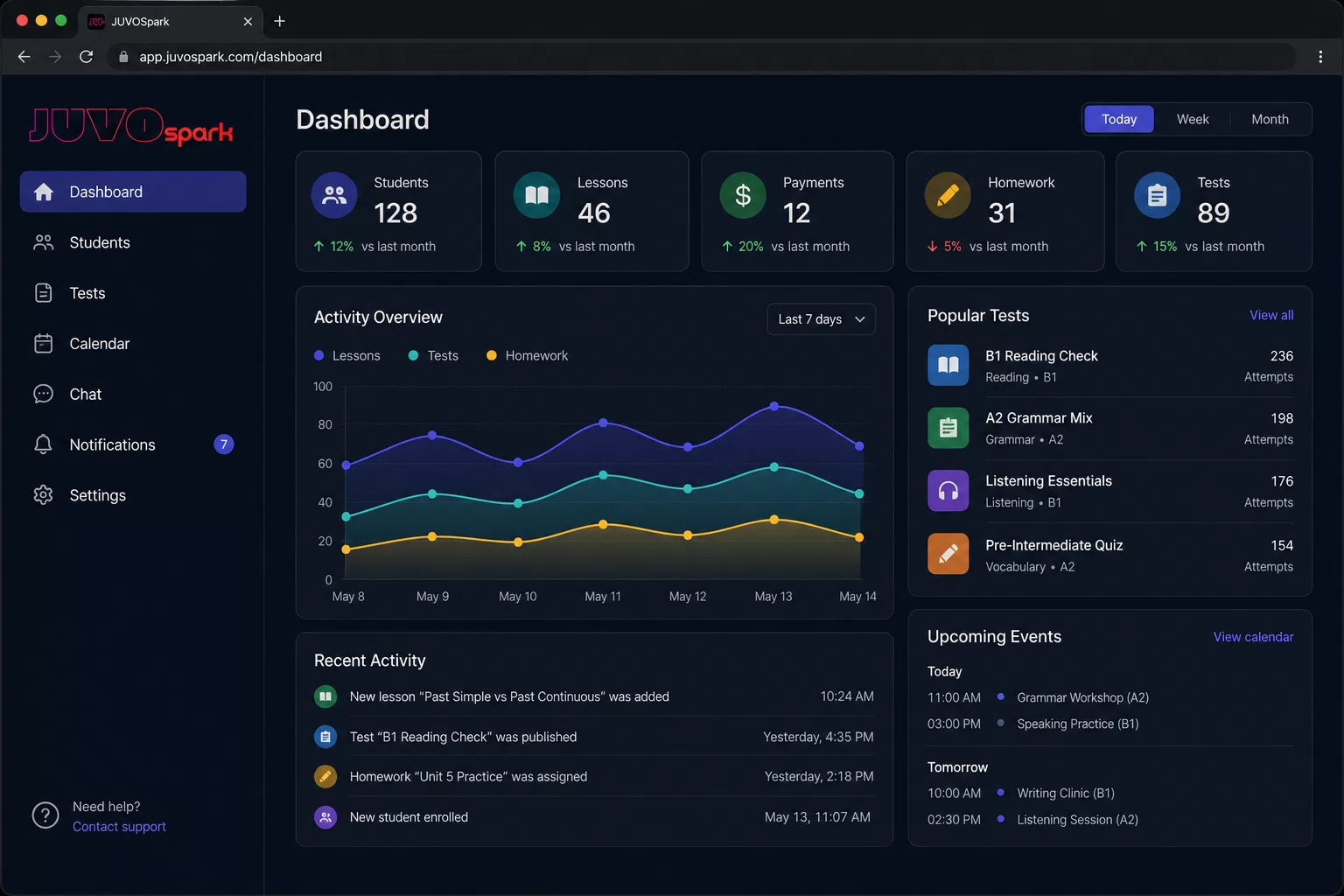
Alongside the bot, a web admin panel runs on a JWT-secured REST API. One backend serves both Telegram long polling and the HTTP API — without domain logic drift.
From the admin panel, the following are managed:
- tests, questions, levels, media for tasks;
- students, attempts, result export;
- lessons and meeting platforms;
- homework and the welcome text for the Homework section in the bot;
- payments as a CRM record: statuses, amount, currency, personal reminders (no payment gateway in v1);
- contacts for the Contacts section in the bot;
- support chat and event notifications;
- analytics and dashboard;
- teacher onboarding and Bot Invite;
- owner operations: teacher list, manual lead binding, transferring a student between teachers, activity overview.
Google Calendar is connected via OAuth as a teacher's calendar integration; full two-way sync was rolled out in phases so as not to block the main scope.
Engineering solutions that hold the system together
The project was built using Clean Architecture: the domain doesn't depend on Telegram or HTTP, and the infrastructure plugs in through interfaces. This allowed the bot and the admin panel to be developed in parallel on a single core.
For Telegram load, the following matter:
- worker pool for processing updates;
- rate limiting on outgoing messages;
- state manager for conversational scenarios (tests, broadcast, support reply);
- graceful shutdown.
For admin panel access — JWT with an owner/teacher role model.
For data — SQLite with a predictable schema tailored to the education domain and invite/binding.
For delivery — Docker, reverse proxy, CI images, controlled updates.
This is not "overengineering for the sake of beauty." It is the minimal set of practices without which multi-teacher EdTech on a single bot quickly becomes fragile.
A real product case: from scenario to platform
The starting point of the project was no longer a blank page: there was a working Telegram scope and an engineering foundation. The task was to grow it into a full-fledged EdTech product with a clear scaling model.
What we actually did:
- Fixed the education domain as the product foundation.
- Assembled the student scenario in a single bot: tests, schedule, homework, contacts, support.
- Moved teacher operations to a web admin panel on the same backend.
- Added invite-only teacher onboarding and personal deeplinks for students.
- Introduced tenant data isolation and owner reassignment tools.
- Brought delivery to a production-grade scope: containers, API, background jobs, admin panel.
Before each architectural decision, we checked a single criterion: does this complicate maintenance as the number of teachers grows. If yes — we looked for a simpler model. This is how the "one bot + invites" principle emerged, rather than "one bot per teacher."
Why we couldn't just "spawn more bots"
The most dangerous decision in such a task is to accelerate by cloning instances.
A separate bot per teacher looks fast only in the first week. Then the following grow:
- maintenance costs;
- the risk of logic version drift;
- complexity of shared updates;
- chaos in access and secrets;
- the impossibility of neatly transferring students between teachers.
A safe scaling path that we built in:
- Keep a single bot entrypoint.
- Separate owner / teacher / student roles.
- Grant teacher access only through invites.
- Bind students through a deeplink or manual bind by the owner.
- Isolate tenant data.
- Give the owner reassignment and monitoring tools.
- Keep teacher management in the web, the student experience in Telegram.
It is precisely this sequence that makes growth reversible and controllable. The phrasing "let's spin up another bot" in mature EdTech usually means future operational debt.
What the product and business get
This approach delivers several effects at once:
- a single channel for students without jumping between tools;
- manageable operations for teachers and the owner;
- controlled growth in the number of teachers without open registration;
- less infrastructure at the start of scaling;
- a clear boundary of responsibility between Telegram UX and the web CRM;
- a foundation for analytics, reminders, and support in one scope.
For the portfolio and for the client, what's important here is not the list of buttons, but the fact that the platform can grow without falling apart into a set of chats.
Conclusion
Strong Telegram EdTech starts not with a menu of buttons, but with a model of entry and growth. If you build in "one bot per teacher" from the start, the product will speed up for a week and slow down for years of maintenance.
JUVOSpark was built differently: a single shared bot as the unified entry point, invite-only teacher onboarding, personal deeplinks for students, data isolation, and a web admin panel for operations. On top of that — a full-fledged educational scenario: tests, schedule, homework, reminders, and support.
This design makes the platform clear for the student, manageable for the teacher, and scalable for the owner — without a zoo of bots and without chaotic public registration.
Next step
If you need an EdTech scope in Telegram with controlled multi-teacher growth, you should start not by cloning bots but with a map of roles, entry points, and rules for binding students.
Then comes the learning domain, the admin API, and only then integrations and the payment gateway.