3D in the browser seems complex. With the right stack — it's just regular engineering
When a client says "we need a 3D configurator," a heavy picture often comes to mind: CAD, expensive modeling, Unreal, a separate 3D team, months before the first demo.
In practice, for many product configurators this is not the right task. You don't need photorealism for the sake of photorealism — you need a clear scene where the user can:
- see the product;
- change parameters;
- place elements;
- immediately get a specification.
This is exactly the MVP we built for the internal drawer filling configurator Blum AMBIA-LINE: LEGRABOX / MERIVOBOX / TANDEMBOX systems, a divider catalog, 3D drag, snap, collisions, order printing.
Short answer: 3D complexity explodes when you drag CAD thinking into the web. It drops when the stack is split into three layers — UI, domain placement logic, lightweight WebGL rendering — and the models are procedural, not "all the STEP files in the world."
What problem we solved
A web demo was needed for Blum's distributor/client channel:
- select a drawer system;
- set internal dimensions (width 450–1300 mm and the related depth);
- choose the front color;
- add AMBIA-LINE elements from the catalog;
- place them in the drawer (drag, 90° rotation, copy, delete);
- see free zones and snap to walls;
- generate an order specification and print it.
This is a classic product configurator, not a factory digital twin. Which means the stack should be product-web, not a CAD pipeline.
Why 3D often seems harder than it is
| Team's fear | What's usually meant | What's needed for a configurator |
|---|---|---|
| "Expensive 3D models are needed" | Full CAD/GLTF with all chamfers | Recognizable procedural geometry |
| "A separate 3D engine is needed" | Unity/Unreal | WebGL via Three.js in the browser |
| "Physics is needed" | A full-fledged physics engine | 2D AABB collisions on the drawer floor |
| "Complex state is needed" | A custom event-bus for everything | One store (Zustand) + React |
| "Long time to first result" | Asset pipeline | Scene skeleton in days, not months |
The main mistake is mixing visualization and business logic into one lump of meshes. Then any rule like "don't place against the wall" turns into debugging Three.js instead of simple geometry in millimeters.
The right stack for this task
| Layer | Technology | Role |
|---|---|---|
| Application | Vite + React 19 + TypeScript | Fast SPA, strict types |
| State | Zustand | Drawer system, dimensions, placed items, selection |
| 3D | React Three Fiber + drei + Three.js | Scene, light, camera, meshes |
| Logic | Pure utils (geometry.ts, placement.ts) |
Collisions, snap, free zones |
| Data | catalog.ts, drawerGeometry.ts |
SKUs, dimensions, system parameters |
Why exactly this:
- React Three Fiber brings Three.js into the familiar React model: components, props, hooks. No need to write a "second framework" on raw
requestAnimationFrame. - Zustand keeps the configuration outside the Canvas. UI panels and 3D read a single source of truth.
- Procedural meshes (
box, simple materials) cover 80% of recognizability without a GLB warehouse. - Geometry in mm is calculated in plain TypeScript; only the scale
1 unit = 10 mmgoes into the scene.
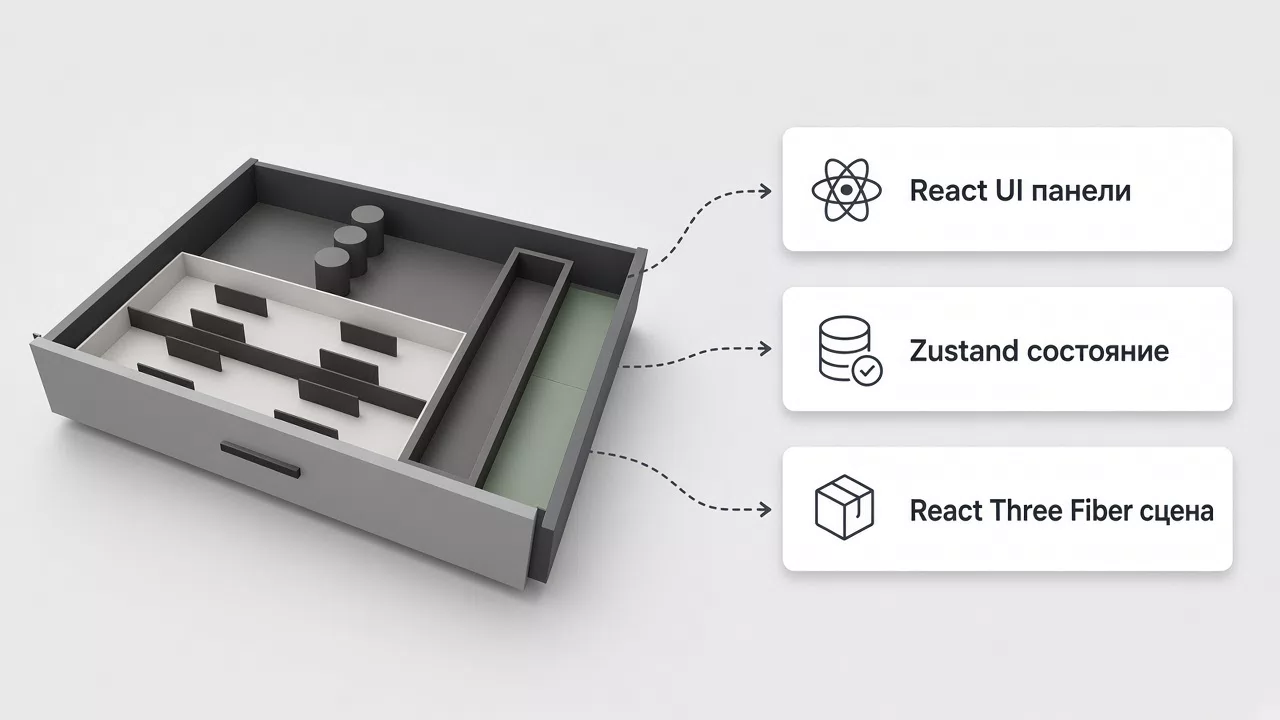
The resulting scheme:
LeftPanel / RightPanel (DOM)
            │
   useConfiguratorStore (Zustand)
            │
     Scene3D (R3F Canvas)
        ├── DrawerBox
        ├── PlacedItemMesh
        └── SnapGuides / FreeZones
            │
     geometry.ts + placement.ts
Here, 3D is the view. The rules are a separate layer. That's what makes the task manageable.
How "modeling" works without CAD
Drawer
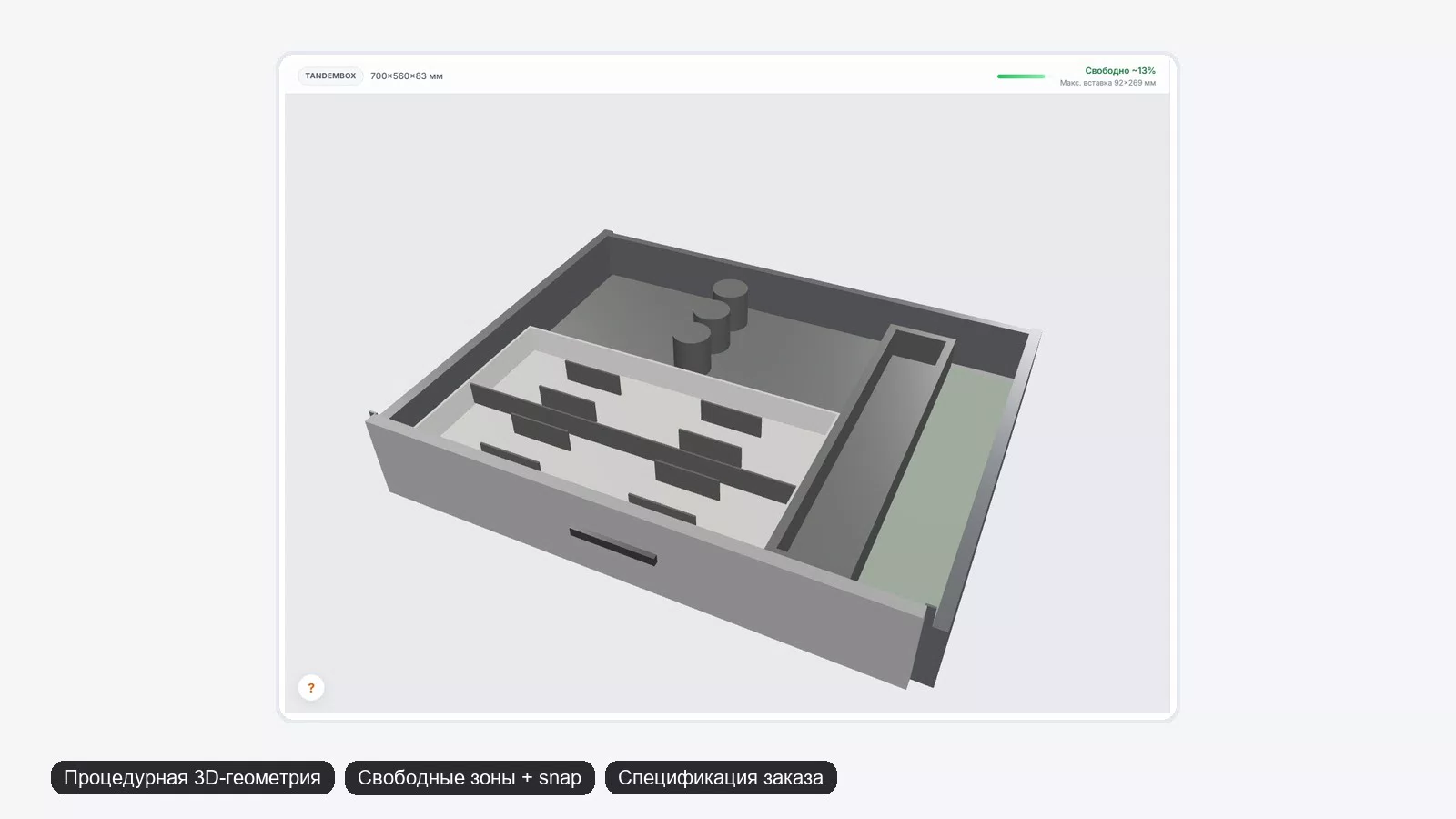
DrawerBox is assembled from primitives: bottom, walls, front, handle, runners. System parameters (thicknesses, side panel material, front reveal) live in drawerGeometry.ts.
Change the system or color — materials and dimensions change, not "re-import the model."
Catalog items
Each product in the catalog has:
- real SKUs/prices (for the demo);
- dimensions in mm;
visualType— which procedural template to draw inCatalogItemModel.
A new product is most often = a new data entry + one visual case if needed. Not a full-fledged 3D pipeline.
Why this is enough
For a configurator, what matters is:
- proportions;
- occupied space on the floor;
- clear drag;
- readable specification.
A photorealistic AMBIA-LINE with micro-chamfers adds almost no conversion in a demo, but it significantly adds time and cost.
The real complexity is not meshes, but placement
This is where the feeling of simplicity usually "breaks." But it also solves well if you don't drag it into shaders.
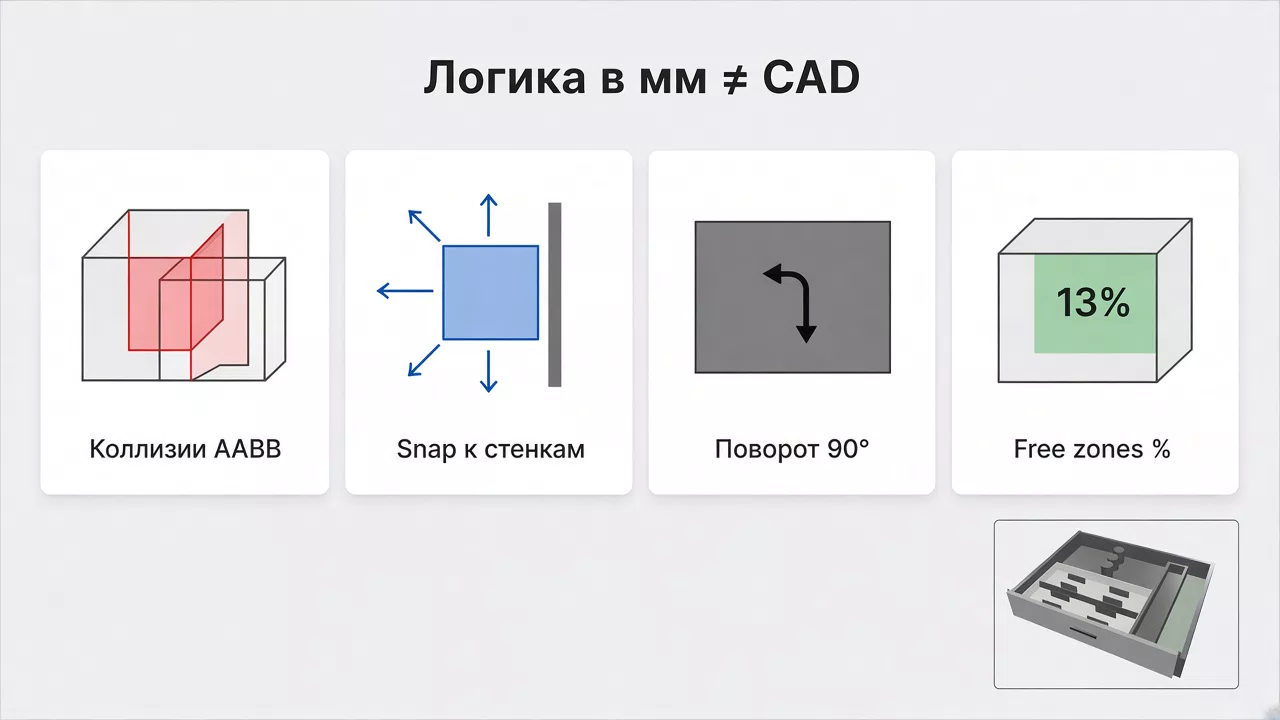
| Task | Solution in the project |
|---|---|
| Rotation 0/90/180/270 | getRotatedSize() — footprint separate from 3D rotation |
| Don't go beyond the walls | isInsideDrawer + margin |
| Don't intersect | AABB 2D + COLLISION_GAP |
| Drag with "sliding" | resolveDragPosition |
| Snapping | applySnapping (threshold ~12 mm), orange guides |
| Auto-add from catalog | findBestPlacement — offsets × rotations × free zones |
| Free space | computeFreeZones + "Free ~N%" status |
An important architectural principle:
- the store holds logical mm and rotation;
- on rotation, the 3D model rotates the group, not recalculates the mesh's width/depth;
- for collisions, the footprint after
getRotatedSize()is used.
This way visuals and rules don't conflict.
Performance: what we deliberately didn't do
To make the demo fly in the browser:
- no heavy
Environmentand realtime shadows; - limited
dpr([1, 1.25]); - during drag, local state is updated, the store — on
pointerup; OrbitControlsis disabled while the user is dragging an element.
This is again about the right scope: a configurator should be responsive, not "AAA gaming."
What the client got as a result
A working web demo:
- 3 drawer systems;
- dimensions and color;
- AMBIA-LINE catalog with search;
- 3D scene with drag/rotate/copy/delete;
- snap and free zones;
- specification + print/PDF;
- onboarding and toast notifications.
And a clear roadmap without the illusion that "3D already = ready enterprise":
| Already have | Next stage |
|---|---|
| Client configurator | Backend / admin panel |
| Local catalog | Sync with 1C/API |
| Procedural 3D | More detailed assets selectively |
| Demo sales scenario | AI-render / extended modes |
Checklist: when a 3D configurator can be done "simply"
A stack at the R3F + procedural geometry level is suitable if:
- products are assembled from repeatable modules;
- dimensions and configuration matter, not cinematic render;
- interaction is select / drag / rotate / snap;
- the result is needed as a specification/order;
- the first demo stand is needed quickly for approval.
It's better to complicate the stack right away (CAD viewer, WASM core, Unreal pixel streaming) if:
- an accurate engineering model "like in CAD" is needed;
- complex curved surfaces and BOM from PLM are critical;
- the user must inspect tolerances/assembly at the production level.
For Blum AMBIA-LINE, the first path turned out to be the right one.
Practical takeaways
1. Don't start with "models."
Start with coordinates, units of measurement, and placement rules.
2. Separate the store from the Canvas.
UI and 3D should read one state, not live in two worlds.
3. Draw procedurally while recognizability is enough.
Plug in GLTF selectively, when an asset really boosts trust.
4. Do collisions on the logical plane.
2D AABB on the drawer floor covers 90% of configurator UX cases.
5. Optimize for the demo device.
Fewer effects — more of a feeling that "the product is already alive."
Conclusion
3D modeling for a product configurator is not necessarily a complex multi-month discipline. With the stack Vite + React + TypeScript + React Three Fiber + Zustand and procedural geometry, the task breaks down into clear engineering pieces: catalog data, placement logic, lightweight scene, specification.
The Blum AMBIA-LINE case is exactly about this: quickly show the volume of a drawer, let users place dividers "by hand" in 3D, and immediately assemble an order — without turning the demo into a CAD platform.
Complexity doesn't come from the word "3D." It comes from choosing the wrong tool for the class of task.
FAQ
Do I need Three.js "from scratch" if I have React?
For a product like this, React Three Fiber is more convenient: less boilerplate, easier integration with UI.
When to switch to ready-made GLTF models?
When procedural primitives stop convincing in a demo or a marketing shot is needed. Not before the first working scenario.
Why 2D collisions if the scene is 3D?
Because elements sit on the drawer floor. The placement task is area planning, not flying through space.
Can this stack scale to production?
Yes: add a backend, catalog sync, auth, and more detailed assets. The store + utils + scene architecture is ready for this.