Why such a tool is needed at all
Most of the "weird" bugs in products don't live in a single function but in transitions between states:
- checkout froze after payment;
- subscription didn't move from trial to paid;
- OAuth flow broke on a rare edge case;
- UI got stuck in loading and stopped responding to events.
In code this is often spread across if/else, flags, and callbacks. On paper or in your head it seems clear. In production it turns out there are unreachable states, deadlocks, and bottlenecks in the funnel.
StateM closes exactly this gap: you describe the logic as a finite state machine, see it on a diagram, run thousands of random scenarios, and get ready-made code for your stack.
What StateM is
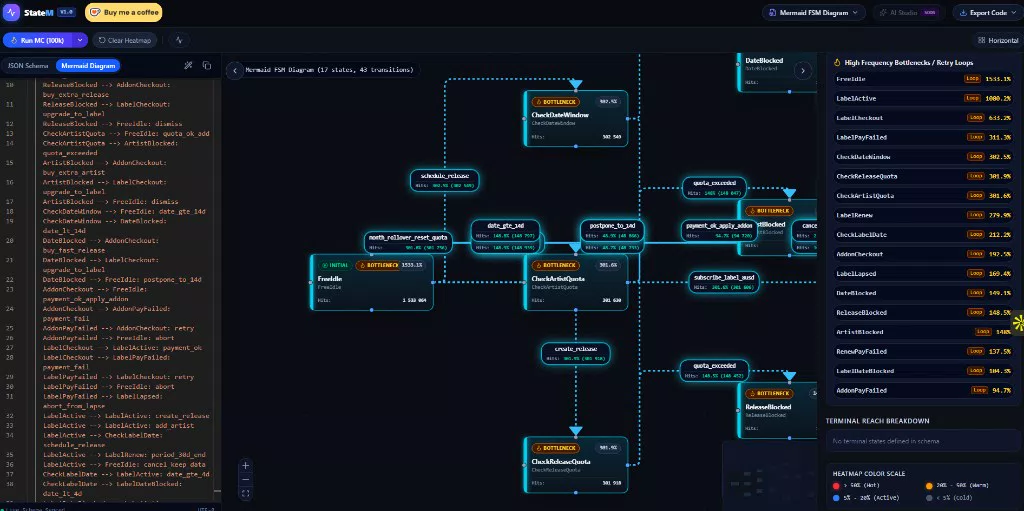
StateM is a free interactive web IDE, Monte Carlo simulator, and visual analytics studio for finite state machines (FSM) and state charts.
Three working modes are available in one window:
- Diagram — a visual model of states and transitions;
- Code — implementation view and export;
- Analytics — simulation results, heatmaps, bottlenecks.
The service is positioned as a "pre-production" tool: to find problems in transition logic before users find them.
Main features
1. Visual FSM editor
You can design and edit complex state machines through:
- JSON Schema;
- Mermaid.js syntax.
This is convenient both for a quick sketch and for a more formal description. The diagram immediately shows how states connect to each other, which events move the process forward, and where the logic starts to "spread out."
2. Monte Carlo Simulation
One of StateM's key features is mass path simulation:
- run from 10,000 to 100,000+ automatic scenarios;
- stress-test the workflow without manually checking every branch;
- search for rare combinations that are nearly impossible to cover with regular test cases.
This is especially useful where there are many branches and the cost of error is high: payments, access, subscriptions, fulfillment.
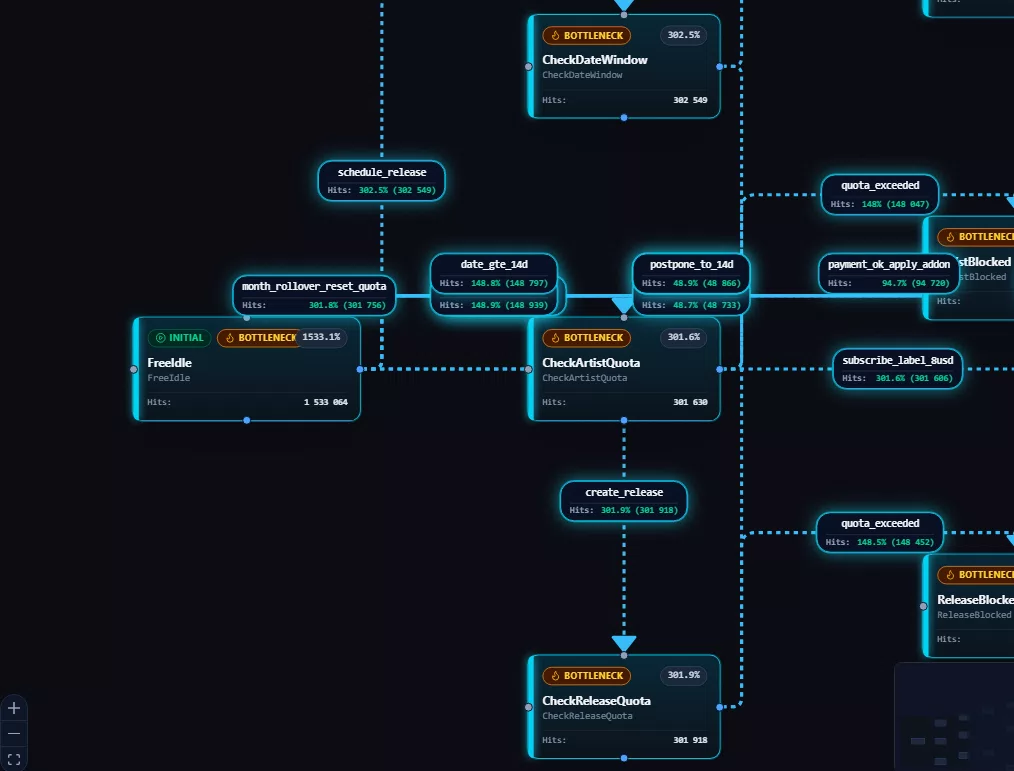
3. Deadlock and bottleneck detection
Based on simulation results, the service helps identify:
- unreachable states;
- terminal traps (the process "dies" prematurely);
- funnel bottlenecks with high latency / traffic concentration.
In practice, this answers the questions:
- where the user actually lands most often;
- which branches are almost never used;
- where the process can get stuck with no exit.
4. Heatmap by states
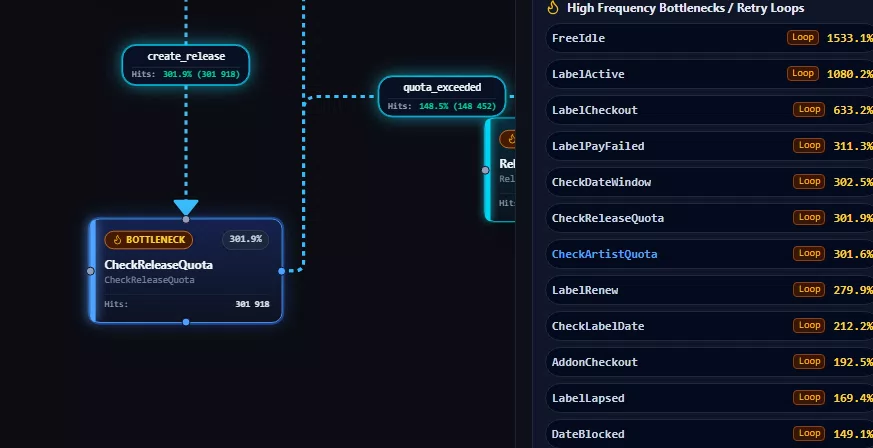
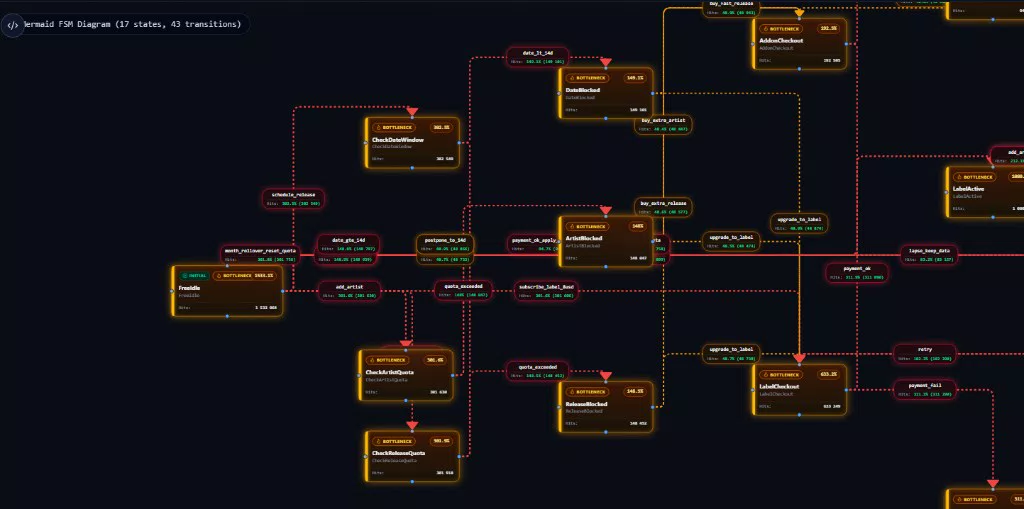
Monte Carlo Heatmaps highlight nodes on the diagram:
- which states are "hot" — the main flow passes through them;
- which are barely visited — candidates for dead code or a coverage gap.
For product/engineering this is a quick way to see the real shape of the process, not just "how it was intended."
5. Step-by-step Debugger
In addition to mass runs, there's a manual mode:
- you trigger events step by step;
- you watch how the machine transitions between states;
- you break down a specific scenario the same way as in a code debugger.
Useful for code review, onboarding new engineers, and resolving a disputed business rule like "what happens if..."
6. Code export to multiple languages
From the model you can get production-ready code with one click:
- TypeScript (XState v5);
- TypeScript (pure OOP class);
- Python (transitions framework);
- Go (stateless / microservices approach);
- Rust (enum + pattern matching);
- Mermaid diagram;
- Raw JSON Schema.
So StateM doesn't stay a "pretty picture in Figma style" but becomes the starting point of the implementation.
Ready-made presets for real processes
So you don't start from a blank canvas, StateM has production presets:
- E-Commerce Checkout — including a demo with a deadlock;
- Subscription Lifecycle — Free Trial → Paid → Churn → Cancel;
- OAuth2 Authentication Flow;
- Order Fulfillment Pipeline.
This is a good way to quickly understand the tool and at the same time verify typical business scenarios that teams face all the time.
The site has a separate Broken Checkout (Deadlock Demo) example — useful for showing the team what "logic that compiles but doesn't work" looks like.
Who this is especially useful for
Architects and backend engineers
They model complex business logic: payment gateways, onboarding, order statuses, entity lifecycle. Before writing services, you can see where the model is leaky.
Frontend developers
They describe UI states of React/Vue apps and export to XState or plain TypeScript — fewer "magic" flags in components.
QA and Reliability engineers
They use Monte Carlo as a risk-analysis layer: hunting hidden edge cases and deadlocks before regression in production.
Product / Tech Lead
They get a common language with engineers: the process is visible on a diagram, not only in tickets and verbal agreements.
What practical value it delivers
StateM addresses several pain points at once.
1. Reduces the cost of an error
Finding a deadlock on a diagram is cheaper than fixing a checkout or subscription after release.
2. Makes implicit logic explicit
Instead of scattered conditions, a single model of states and transitions appears.
3. Speeds up alignment
A diagram is easier to discuss with product, QA, and development than a wall of pseudocode.
4. Improves the coverage of thinking
Even if automated tests aren't written yet, Monte Carlo already shows "where the system goes" and "where it gets stuck."
5. Shortens the path from design to code
Export to XState / Python / Go / Rust removes manual "by eye" transfer of the model.
6. Works well for team learning
The presets are convenient for explaining what a deadlock, unreachable state, and bottleneck look like in a real business flow.
This is exactly what the screenshots above show: not an abstract "as designed" scheme, but a map of the model's real behavior after hundreds of thousands of runs — with Hits, Loop, and BOTTLENECK.
What a typical workflow looks like
- Pick a preset or describe your own process in JSON / Mermaid.
- Check the diagram by eye: are all states and transitions in place.
- Walk the critical path manually in the Debugger.
- Run Run MC (100k) and review Analytics: deadlock, heatmap, bottlenecks.
- Fix the model.
- Export code for the required stack and integrate it into the product.
This cycle works especially well before a major feature: a new checkout, billing, order statuses, complex onboarding.
What's already there and what's next
Already available:
- visual editor;
- Monte Carlo for tens/hundreds of thousands of paths;
- debugger;
- analytics / heatmap;
- export to multiple languages;
- ready-made presets;
- responsive interface for desktop and mobile.
The roadmap on the site marks as Soon:
- AI Studio;
- AI Edge-Case Audit.
So the direction of development is even deeper automatic analysis of rare scenarios with AI.
When StateM is especially appropriate
It makes sense to bring in the tool if you have:
- many statuses and transitions in one domain;
- a high risk of financial or access-related errors;
- the team argues about process behavior "in words";
- regressions regularly surface on rare branches;
- you want to lock down the behavior contract before coding.
If the process is completely linear ("opened the form → submitted → done"), the benefit will be smaller. The more branching the logic — the more useful the visual model and Monte Carlo.
Limitations to keep in mind
Like any model simulator, StateM tests your model, not the entire real production system:
- if important events aren't included in it, they won't be found;
- external races, network, and infrastructure failures must be accounted for separately;
- code export is a strong start, but still requires review for your project.
So the best mode is to use StateM as a design and risk-analysis layer alongside regular tests and monitoring, not instead of them.
Bottom line
StateM is a practical tool for teams that care not just about "drawing a flowchart" but about verifying the behavior of a complex process before release.
It helps you:
- make the state machine visible;
- run tens of thousands of scenarios;
- see deadlocks, bottlenecks, and path skews;
- quickly get code for TypeScript, Python, Go, or Rust.
If your product already suffers from checkout, subscriptions, auth, or order statuses — that's exactly the class of problems StateM was built for.
Next step
Open StateM, take the Broken Checkout or Subscription Lifecycle preset, run Monte Carlo, and see which states light up on the heatmap. Even on the demo you can usually see why such tools save weeks of debugging in production.